
How to Manage Berqun Activities?
This article is a machine-translated draft and will be reviewed shortly.
With Berqun’s Productivity Panel, you can manage your activities very easily.
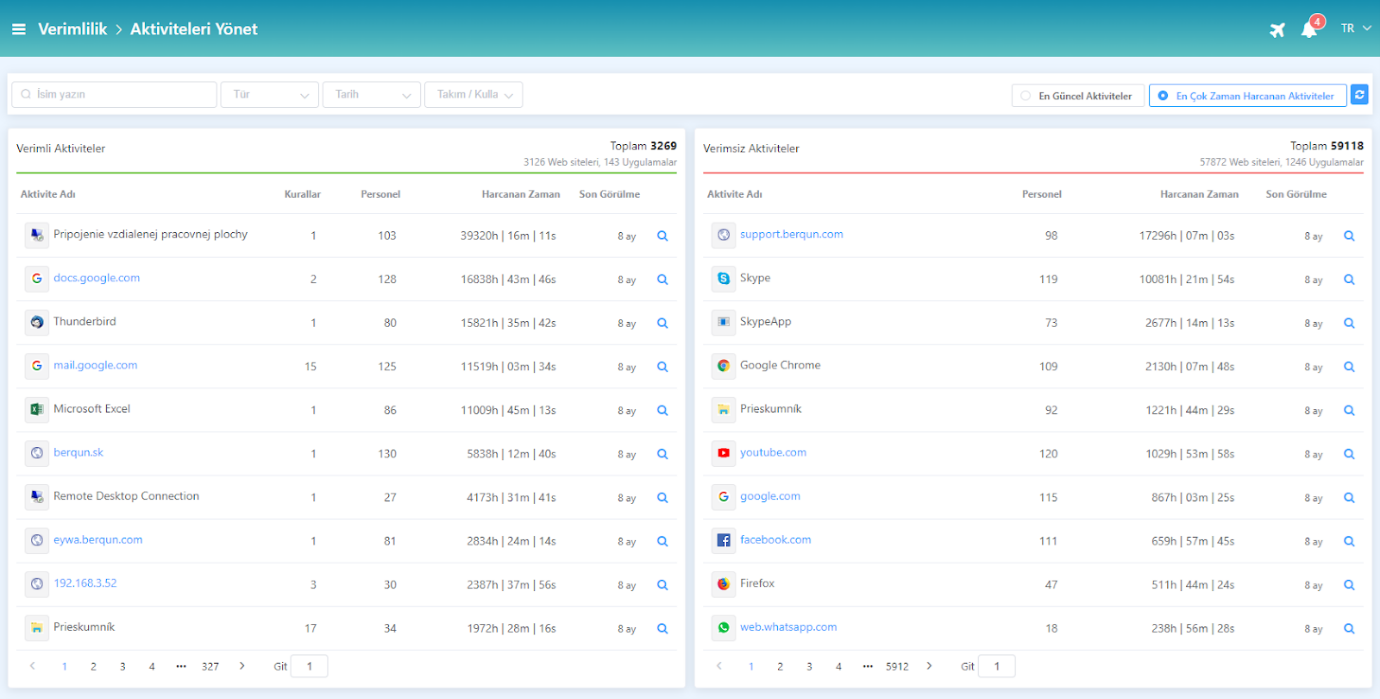
After clicking on the Productivity panel, in the Manage Activities section, you can find a screen where all the activities recorded by the system are listed by their productivity status and where their details can be viewed.
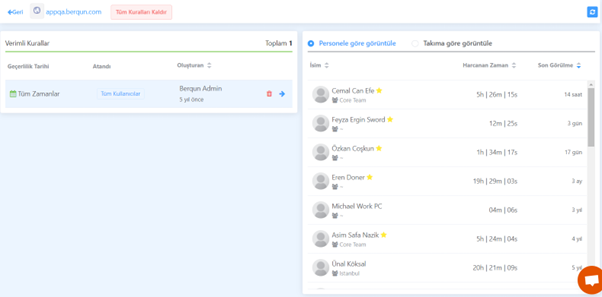
- On the left side, you can view the list of currently defined rules.
- On the right side, you can view the list of users using this activity, time spent, or sorted by last record dates.
- On the left side, you can view the list of currently defined rules.
In addition, thanks to the “Most Recent Activities” and “Activities with the Most Time Spent” options located in the upper right, you can view both the most recent activities and the activities on which the most time has been spent so far.

From the activities page, you can view the productivity rule related to an activity by using the magnifier icon next to each activity. You can also view the time spent on these activities on a per-employee or per-team basis.
If you want to change the productivity status of an activity you have selected and mark it as unproductive, check out our content titled “Making a Productive Activity Unproductive” right away!