
Merging Duplicated Employee Records
This article is a machine-translated draft and will be reviewed shortly.
When multiple records are created for the same employee in the Berqun system, you can create a cleaner and more organised employee list by merging these duplicated records. During this merging process, the activity data from the employee’s different records is intelligently combined and productivity scores are calculated correctly.
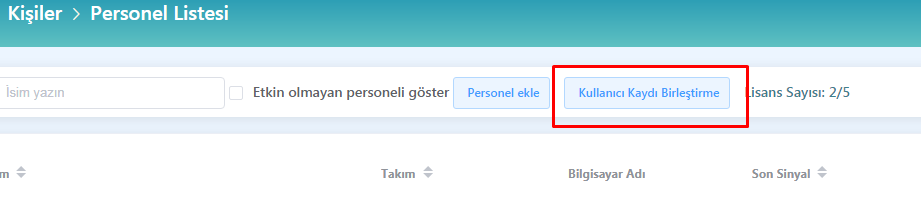
- When you click on the “Employee List” tab in the “People / Permissions” menu, you will see the “Merge User Record” button below the records.
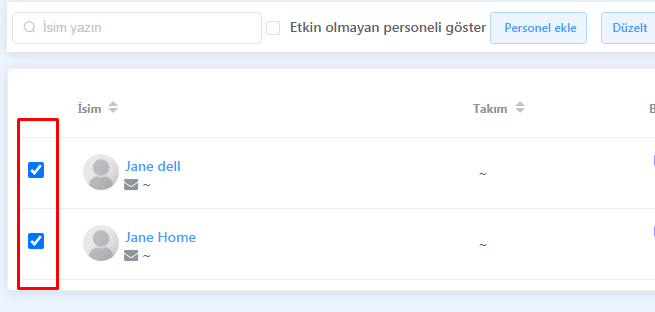
- Select the duplicated employee records you want to merge. These records may be different entries belonging to the same person.
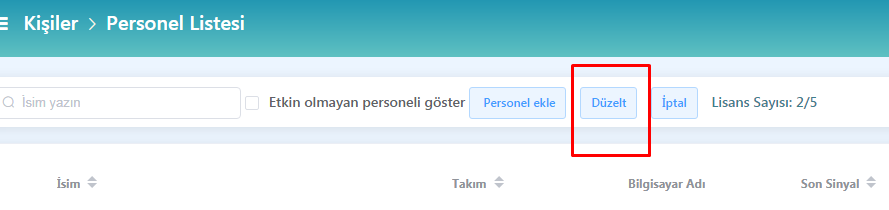
- Click the “Correct” button to merge the records you have selected.
By following these steps, you can merge multiple records of the same employee in a clean and organised way. During this merging process, the activity data from different records is combined by an intelligent algorithm and productivity scores are calculated correctly.
If you want to update your employees’ profiles, you can review our content titled Updating an Employee Profile.